How Codex Security finds vulnerabilities, step by step
TL;DR: Codex Security bets on gpt-5.6-sol at xhigh reasoning to read every file and find vulnerabilities, with receipts proving each file was read in full. At $5/$30 per million tokens, watch the bill: the spending cap is off by default.
OpenAI open sourced Codex Security on July 28. It went from 243 stars to 7,117 in two days. This is the productized descendant of Aardvark, the agentic security researcher announced in October 2025.
I looked under the hood of Codex Security so you know what happens when you run codex-security scan on your repo.
Codex Security functionality
- Run an end-to-end scan. Point
scanat a repository, a path, a diff, or your working tree, and it runs the whole pipeline.bulk-scandoes it across many repos at once. - Scan standard or deep. Standard is one pass over every file. Deep is the same pipeline run until it stops finding things, repeating discovery up to 60 times with parallel workers.
- Run one step by hand with
validate,export,compare,rerun, orfalse-positive. - Remediate and harden.
patchwrites a fix behind its own verification gates, andpropose-security-hardeningproduces architectural guidance instead of diffs.
How a standard scan works
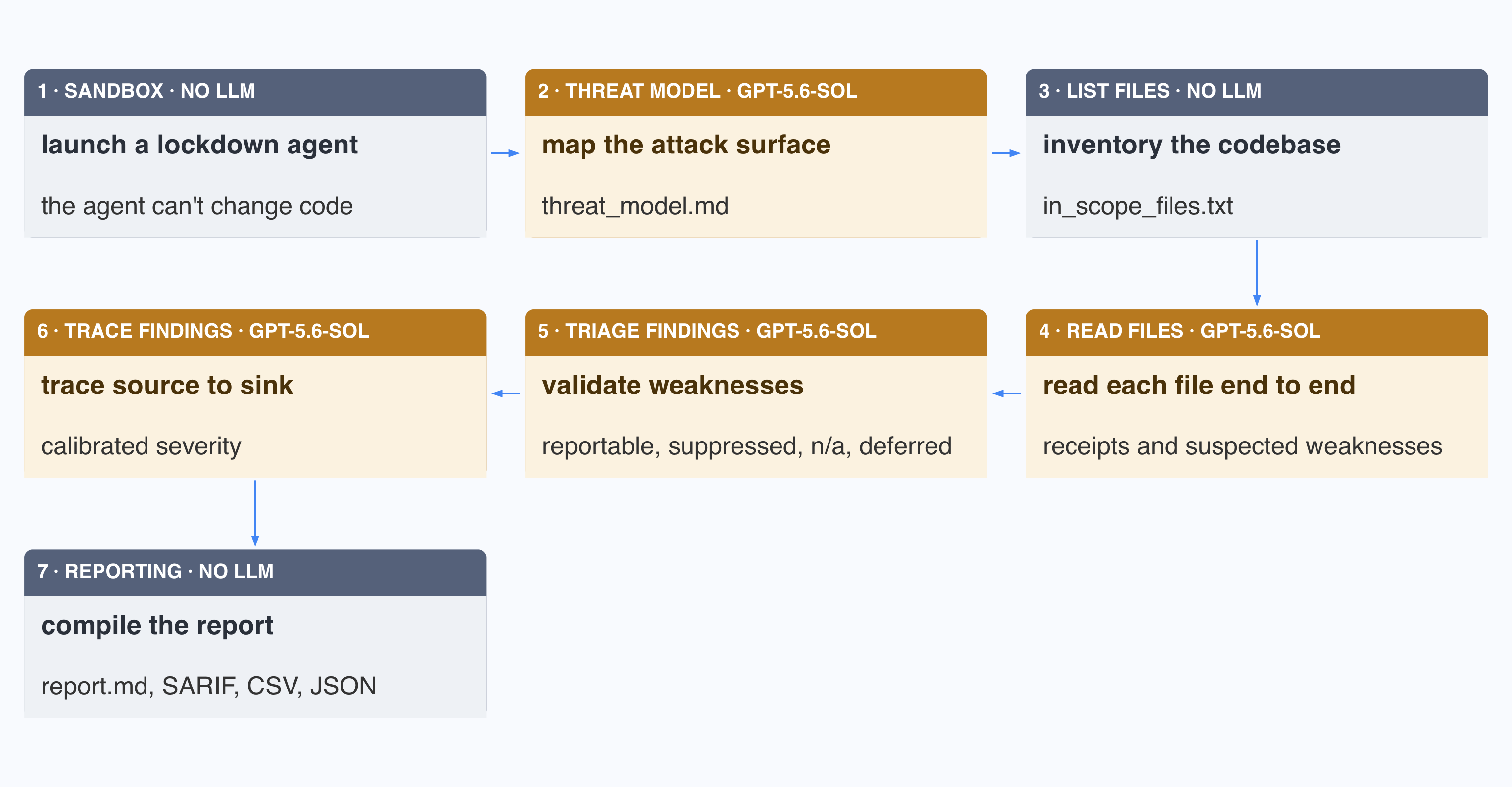
- Sandbox. The SDK launches the Codex agent locked down: approvals
never, read anywhere, write only inside the scan directory. - Threat model. The agent maps the attack surface into
threat_model.md: trust boundaries, attacker-controlled inputs, and severity examples calibrated to this repo. The document is injected into the model's context at every step that follows. - List files.
rg --files --hiddeninventories the codebase, including test and demo code, intoin_scope_files.txt. Files the model can't read, like binaries, are listed as unreviewed instead of silently ignored. - Read files. The harness forces the model to read each file with the threat model in context. The prompt is just one sentence naming six weakness classes, from unsafe command execution to missing permission checks. Reading returns receipts and findings. A receipt proves the file was read in full, and a finding describes a suspected weakness. The deep scan changes this step and nothing after it: it ranks files first, runs parallel workers that each build their own threat model, and repeats discovery until six consecutive rounds find nothing new or it hits 60 runs.
{
  "path": "src/api/upload.py",
  "full_file_reviewed": true,
  "disposition": "no_findings",
  "evidence_note": "..."
}

{
  "cwe_ids": ["CWE-22"],
  "locations": [
    {"path": "src/api/upload.py",
     "start_line": 47, "role": "sink"},
    {"path": "src/util/paths.py",
     "start_line": 12, "role": "root_control"}
  ],
  "summary": "user-controlled filename reaches open()",
  "evidence": "..."
}
The harness rejects any result that reports no findings for a file without a receipt.
- Triage findings. Each candidate is validated as either
reportable,suppressed,not_applicable, ordeferred. The model picks the validation method in preference order: a crashing proof of concept first, then sanitizers, a debugger, an adapted test, an end-to-end request, and reading the code by hand last. - Trace findings. The model traces each finding from source to sink and documents exposure, identity and privileges, attacker input control, preconditions, existing mitigations, and any trust boundary crossing. The model then rates each finding
critical,high,medium,low, orinformationalagainst a hardcoded severity policy, or drops it asignorewhen the code is not attacker-reachable. - Reporting. The harness compiles
report.mdfromfindings.jsonandcoverage.json, and exports the findings as SARIF 2.1.0, CSV, or JSON.
Patching and hardening
A scan only reports, it never edits your code. Fixing is a separate command, codex-security patch, which builds the fix and a regression test in a throwaway copy of your repo, then applies it only after five checks pass.
propose-security-hardening reads all the findings and writes a design document with several genuinely different options, their tradeoffs, and before-and-after diagrams. The deep scan runs it by default.
My take:
- Codex Security is its own CLI, not a
codexsubcommand. Under the hood it exact-pins@openai/codex0.144.6 as a dependency and drives the Codex agent through a bundled plugin of skills and scripts. - In our study of the functionality-security gap in AI-generated code, we measured what a security review by Claude and Codex buys you. A review-and-fix round lifted the secure-and-functional rate from 48.5% to 56.0% for Opus 4.8 and from 43.0% to 47.0% for GPT-5.5, cost up to four times a plain build, and broke working code in 8 tasks.
- I ranked fifteen vulnerability-discovery frameworks and found the winners share a code graph, tight context management, and an oracle that runs the exploit. Codex Security has none of the three. It bets on a strong frontier model at high reasoning to read the files, find security weaknesses, and validate them.
- Codex Security is expensive by design because the model does all the security work. It has to be a frontier model at high reasoning, and OpenAI sets
gpt-5.6-solat xhigh by default, priced at $5 per million input tokens and $30 per million output. Pay attention: the spend cap,--max-cost, is opt-in and off by default. - The main goal of the harness is to prevent the model from giving up early and moving on. Do not stop at the first finding. Do not skip a file because it is a demo. Prove you read it, because a model will otherwise claim it reviewed a file it only grepped. I spotted the same pattern in Pliny's T3MP3ST.